Before you start
Estimate capacity from measured files, expected growth and explicit headroom.
- First step
- Measure representative photo, video and document sizes before entering your own values in the estimator.
Done when
- Your estimate includes the planning horizon and the assumptions beside the arithmetic.
- You separately allowed for retained versions and additional copies where your plan needs them.
Limit of this method: The calculator uses decimal GB and does not include backup history, provider overhead or extra retained copies.
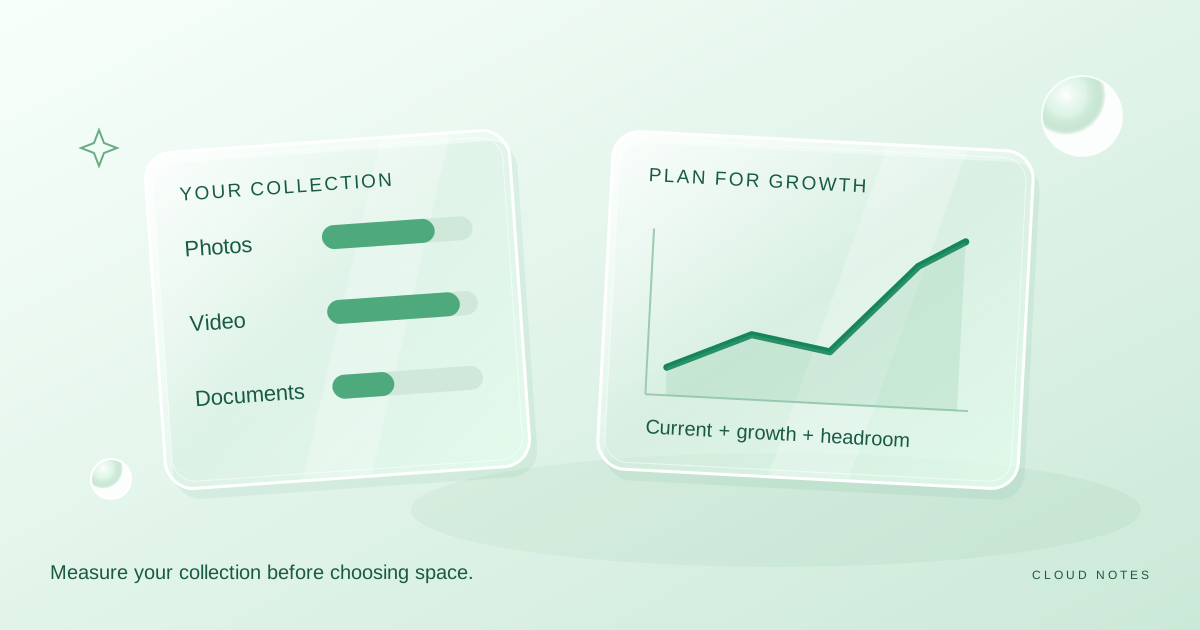

Keep measured sizes, growth assumptions and a review date beside your capacity estimate.
Free text worksheet. No signup. Fill it locally; the site does not receive your entries.A storage plan should fit what you keep and how quickly it grows. Counting devices is a poor substitute for measuring data. One phone used for long videos may create more data than several laptops used mainly for documents.
This guide explains a simple estimate. It does not recommend a provider or a paid plan, and it does not rely on current subscription prices. Use your own sample files and the free storage estimator to make the calculation relevant to your collection.
Measure the current collection
Check the size of the folders you intend to store. Separate photos, videos, documents and everything else. If your account shows an overall usage figure, check what it includes. A storage quota may cover more than the folder visible in your file browser.
Make a note of your units. In this guide and our calculator, one GB means 1,000 MB and one TB means 1,000 GB. Some operating systems display binary units or label them differently. Compare like with like before treating a small difference as missing data.
Do not count an online placeholder as if it were an entire locally stored collection. Also avoid double counting a folder merely because it is visible from two synced devices. You are estimating retained file contents, not how many screens can show them.
Sample photos and videos separately
Pick a representative group of recent photos and calculate the average size. A set of edited images, raw files or screenshots may differ from ordinary phone photos. If your collection mixes these types, estimate them separately.
For video, record the total minutes and a measured average MB per minute. Resolution, frame rate and encoding can change file size substantially, so a single universal number is unreliable. Use the properties of recordings from your own device.
For an illustrative calculation, 8,000 photos at 4 MB each use about 32 GB. Two hundred minutes of video at 150 MB per minute add 30 GB. Add 8 GB of documents and other files, and the collection totals 70 GB. The sizes are example inputs, not expected defaults for every phone.
Add a growth horizon
Estimate how much new data you keep in a month. You can compare two snapshots of folder sizes or review the amount imported during a recent month. A holiday month may not represent normal use, so choose a period that fits your habits.
The formula is current GB plus monthly growth GB multiplied by the number of months you are planning for. Then add a headroom allowance. With the 70 GB example, growth of 3 GB per month over twelve months brings the estimate to 106 GB. A 20 percent allowance produces 127.2 GB.
Headroom is a planning choice. It is not a guarantee against running out of space. If you expect a new camera, a major scanning project or a shared family collection, add that separately rather than hiding it inside a vague percentage.
Account for retained versions
A working copy estimate is not a complete backup estimate. Multiple retained versions, exported archives and duplicate libraries can consume additional capacity. Check how your actual service counts them and how long it retains them.
If you plan to keep three full independent copies, each destination needs its own capacity. You cannot assume a 127 GB estimate across three destinations means every destination only needs one third of that amount.
Leave room for temporary work too. Importing, sorting and converting a collection can briefly create both old and new versions. A destination that barely fits the final library may not fit the migration process.
Reduce clutter before choosing a plan
Identify easy candidates: repeated exported videos, old installers and large temporary files. Confirm a file's purpose before removing it. A duplicate name does not prove duplicate contents, and an older copy may contain a version you need.
Work on a backed up sample first. Avoid using aggressive automated deletion as the first response to a quota warning. A modest amount of extra capacity can be less disruptive than rushed cleanup of irreplaceable material.
Set a reminder to review the estimate after three months. Compare predicted growth with actual growth. If the estimate was wrong, adjust the inputs rather than blaming the arithmetic.
Check the arithmetic with a worked estimate
Use the same units throughout. In the example below, 1 GB equals 1,000 MB. The inputs are illustrative; a video from your own device may have a very different measured size.
| Component | Calculation | Estimated size |
|---|---|---|
| Photos | 8,000 × 4 MB ÷ 1,000 | 32 GB |
| Video | 200 minutes × 150 MB ÷ 1,000 | 30 GB |
| Other files | Measured folder total | 8 GB |
| Current collection | 32 + 30 + 8 | 70 GB |
| Twelve months of additions | 3 GB × 12 | 36 GB |
| Collection plus growth | 70 + 36 | 106 GB |
| With 20 percent headroom | 106 × 1.2 | 127.2 GB |
Now change only the monthly growth assumption from 3 GB to 6 GB. The resulting estimate becomes (70 + 72) × 1.2, or 170.4 GB. That difference comes from a real planning input, not from choosing a more expensive plan first.
A sensitivity check like this is useful when you do not yet have a representative growth measurement. Record a lower and a higher plausible value, then compare both with the capacity you are considering. Do not call either value a prediction with guaranteed accuracy.
Know what would invalidate the estimate
The worksheet needs updating if you start keeping large original video files, add another person's library or retain multiple full exports. If the service counts other products against the same quota, include their actual usage too. Backup history still needs a separate allowance based on the chosen service or method.
Open the storage estimator to try these values. Download the storage planning worksheet to keep the measurements, assumptions and review date beside the result.
A sensitivity check before paying for more space
Capacity decisions are affected by assumptions, not only arithmetic. Use the storage estimator with the same starting collection and change one input at a time. The following figures are illustrative, not measured from a person's account.
| Scenario | Current GB | Growth per month | Months | Headroom | Planned capacity |
|---|---|---|---|---|---|
| One-year estimate | 70 | 3 GB | 12 | 20% | 127.2 GB |
| Growth doubles | 70 | 6 GB | 12 | 20% | 170.4 GB |
| Shorter horizon | 70 | 3 GB | 6 | 20% | 105.6 GB |
| More headroom | 70 | 3 GB | 12 | 30% | 137.8 GB |
The first scenario assumes 8,000 photos at 4 MB each (32 GB), 200 video minutes at 150 MB per minute (30 GB), and 8 GB of other files. That gives 70 GB today. Growth adds 36 GB over twelve months; adding 20% headroom gives 127.2 GB. If your video bitrate or backup retention differs, replace those assumptions with measured values instead of copying the example.
The table estimates **primary storage capacity**; it does not count multiple backup generations, duplication between services, provider metadata or storage quotas shared with email. Save your inputs, their measurement source and a review date in the storage planning worksheet.
Common questions
Should I buy the largest plan immediately?
Only if your measured needs justify it. Compare usable capacity, export options, account access and recovery behaviour alongside price when you evaluate a real plan.
Can compression solve the problem?
It depends on file type and acceptable quality. Some media is already compressed. Keep originals when you may need them, and test any conversion on copies before replacing a library.
What does the calculator leave out?
It does not inspect your device or account. It uses the values you enter and does not automatically include provider overhead, retained history or extra backup copies.
Examples are illustrative planning exercises unless a source says otherwise. Read our editorial policy for sources, AI assistance and corrections. See example data and checking methods for reproducible calculations and practice files.