Before you start
Separate matching file contents from the decision that a location is no longer needed.
- First step
- Use the supplied five-file mini lab before reviewing a small ordinary folder of your own.
Done when
- You identified matching content and recorded which copy has a continuing purpose.
- Any planned removal has a verified keeper and does not discard a needed backup or reference.
Limit of this method: Equal names or sizes do not prove equality, and a hash match alone does not authorise deletion.

Separate content matches from keeper decisions, required copies and realistic storage recovery estimates.
Free text worksheet. No signup. Fill it locally; the site does not receive your entries.A folder full of report, report copy and report final is untidy, but the names do not tell you which files are duplicates. Two different names can contain exactly the same bytes. Two matching names can contain different revisions. Even two identical files can have different jobs, such as a working copy and an independent backup.
To find duplicate files on Windows safely, split the task into two decisions: establish what is actually the same, then decide whether both locations are still needed. This guide provides a bounded review method, a five file mini lab you can reproduce, and a log for recording the keeper. It does not include an automatic deletion script.
The main workflow is for ordinary personal files in a folder you understand. It is not a cleanup procedure for Windows, Program Files, application databases, cloud caches or an employer's controlled records. If you cannot explain why a folder exists, leave its contents alone until you can.
Define the duplicate you are looking for
The word duplicate can describe several different situations. Treating all of them as one category is how a useful revision or an original photograph gets removed.
| Observation | What it suggests | What still needs checking |
|---|---|---|
| Same filename | The files may be related | Contents and version differences |
| Same size in bytes | They are comparison candidates | Whether the bytes actually match |
| Same SHA256 hash | Strong practical evidence of matching bytes | Purpose, references and required copies |
| Similar looking photos | The images may show the same scene | Resolution, edits, format and preservation needs |
| Same document text | The visible content may agree | Comments, formatting, attachments and file data |
This guide concentrates on exact binary duplicates. Finding near identical photos or comparing revisions in Word needs a different comparison step. Do not force a visually similar file into an exact match group merely because the preview looks familiar.
Choose a small folder with a clear boundary
Pick one collection, such as a completed home project or a recent Downloads batch. Write down the path and why you are reviewing it. A useful boundary might be the documents for one appliance repair, rather than every file on the laptop.
Close files you are actively editing. Decide whether cloud connected files are fully available locally before reading them for comparison. A name visible in a synced folder does not necessarily mean the complete file is already on the computer. Reading a placeholder can trigger a download, take time and use space.
For OneDrive specifically, Microsoft's Files On Demand guide explains the availability states. If you do not understand the sync location or the effect of deleting from it, practise in the separate mini lab first. Checking a local copy does not automatically make changes to its source safe.
Keep a recovery copy of important material before reorganising it. A duplicate review should not begin by deleting the backup that would help you recover from the review itself. If the collection is irreplaceable and you do not have a usable recovery route, the right first task is a backup and restore check.
Use filenames and sizes to shortlist candidates
File Explorer can help you inspect a small collection. Use a details view, look at names and file types, and compare the full paths. Where available, inspect the exact byte length in file properties rather than assuming two rounded size labels mean the same number of bytes.
Place possible matches in a review list, not a deletion list. The shortlist should show the complete source path, the exact size where known, and the reason the file looks related. Avoid moving all candidates into one folder just to compare them. That can introduce name collisions and break the context you need to make the decision.
A modified date is another clue, but it is not an authority signal. A copied file may have a newer filesystem date without containing newer work. Open the relevant document and look for the actual revision, amount, page, worksheet or edit you care about.
If you use a duplicate finder, start with its report or preview mode, and check what it defines as an exact match. A product that groups by name or image similarity is answering a different question from a byte comparison. Do not enable bulk removal simply because a scan produced a long list.
Compare actual contents with a file hash
A cryptographic file hash is calculated from file contents. Microsoft's Get FileHash reference documents SHA256 comparison and explains why a rename does not change the hash when the file bytes stay the same.
For a practical exact duplicate review, compare the same algorithm for every candidate. Same byte length plus the same SHA256 value is strong evidence that the compared contents match. Hashes have theoretical collision limits; they are a practical comparison method, not an explanation of the document's purpose or an identity certificate for its owner.
Hashing reads the file. Large videos, archives or files that need downloading can take time. A failed read is an unresolved item, not evidence that the file is empty or disposable. If a file changes while you are comparing it, close the application and repeat the comparison on stable copies.
There is also a distinction between matching bytes and matching appearance. Saving an unchanged paragraph through a different application can change the file container, metadata or encoding. Two files can look the same while their hashes differ. In that situation, investigate the format and revision; do not conclude that either file is corrupt just from the mismatch.
Try the reproducible five file mini lab
Download the duplicate review mini lab. Extract it into a separate local folder. It contains synthetic text files, an expected results file and optional PowerShell commands that only read the sample receipts and display hashes.
The sample files were created for this guide. Their bytes and SHA256 values were checked with Python hashlib and independently with Node crypto during preparation on 21 October 2026. This demonstrates the comparison rules on known inputs. It is not a benchmark of Windows scanning software and not a test of your own folders.
| Sample path | Bytes | SHA256 prefix | Observation |
|---|---|---|---|
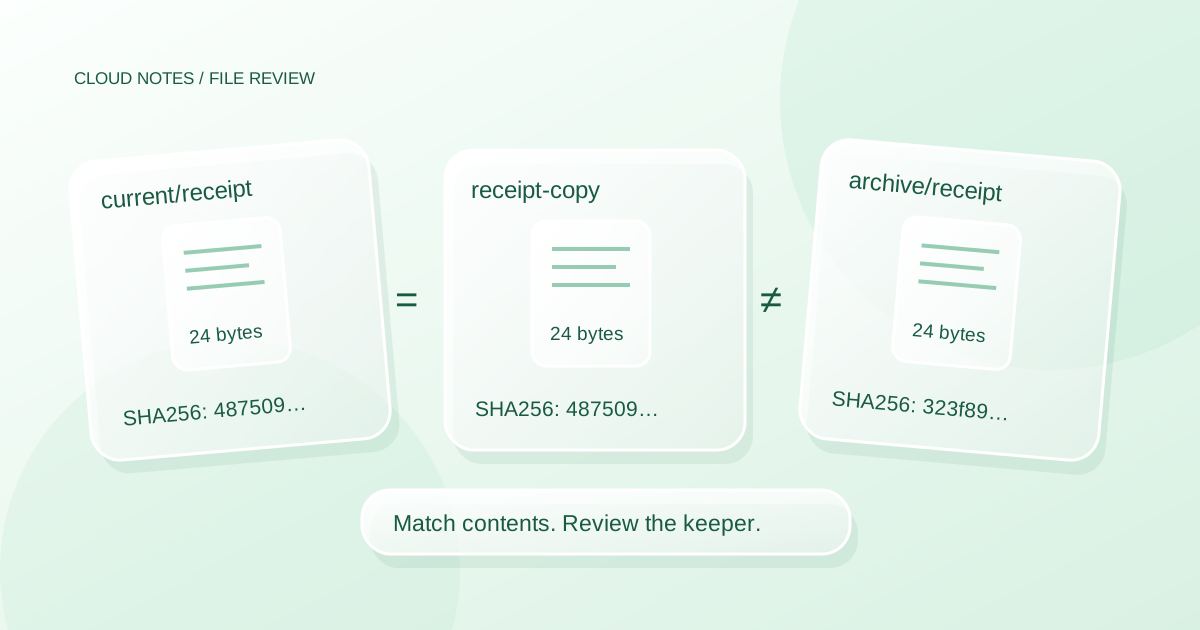
| current/receipt.txt | 24 | 48750900ebb5 | Reference receipt |
| downloads/receipt-copy.txt | 24 | 48750900ebb5 | Exact receipt copy |
| archive/receipt.txt | 24 | 323f898a7eb5 | Different amount |
| current/notes.txt | 17 | 77e2da620765 | Different meeting time |
| archive/notes.txt | 17 | 48bf0d884150 | Different meeting time |
The two receipt files in current and downloads have the same bytes even though their names differ. The archive receipt has the same length but a different total inside it. The two notes have the same name and length but describe different meeting times. A name or size based cleanup rule would therefore produce the wrong grouping in this tiny collection.
Inspect the files before resaving them. They use UTF8 text without a byte order mark and LF line endings. If an editor changes encoding or line endings, the bytes and hashes change even if the visible words look the same. The expected results file contains full hashes; the table above uses short prefixes only to keep it readable. Never use a short prefix as your full equality test.
Expected result: one exact duplicate group containing two receipts, and three other distinct contents. The correct outcome of the lab is understanding that grouping. You do not need to delete any sample file to complete it.
Choose a keeper by purpose, not by the prettiest name
After confirming matching contents, ask which path should remain authoritative. A keeper is the file you intend to use for the collection's continuing purpose. The latest modified timestamp or the shortest filename is not enough to choose it.
For an ordinary working folder, a copy inside the clearly named project may be more useful than an identical attachment left in Downloads. For a backup collection, an identical copy on another device may be intentionally necessary. For a shared project, other people may depend on the current link or path.
| Pair of matching files | Reasonable review decision | Reason to pause |
|---|---|---|
| Project PDF and an old Downloads attachment | Keep the documented project location | The attachment has an annotation or different actual bytes |
| Working document and independent backup | Preserve both roles | Backup purpose or retention is unclear |
| File used by a spreadsheet and a spare copy | Preserve the referenced path until reviewed | You have not checked the link or formula |
| Shared file and a private copy | Confirm ownership and access expectations | Other people may use the shared link |
Record the chosen path and the reason. If you cannot identify which document someone expects to receive, the problem is version ownership, not storage waste. Resolve it before deleting a copy that might be the established handover location.
The folder system guide helps choose stable homes. A meaningful folder and a clear responsibility for the current file reduce future duplicates more effectively than repeatedly renaming everything final.
Estimate space you might recover honestly
For one exact content group with n independent copies of size S, keeping one copy gives a simple upper bound of (n minus 1) multiplied by S. It is an upper bound for ordinary independent copies, not a promise about the storage meter.
For example, four independent copies of a 250 MB video would occupy 1,000 MB of file content. Keeping one would leave 750 MB of potentially removable content. If one of the other copies is a required backup, your current cleanup candidate is at most 500 MB instead. State which roles you excluded.
In the mini lab, the only duplicate group is two 24 byte receipts. Its simple duplicate content upper bound is 24 bytes. The lab is intentionally too small to be a useful cleanup target; it demonstrates the rule without risking real documents.
Actual free space may differ because files are compressed, linked, represented by cloud placeholders or held in a recycle bin. Removing a filename is not always equivalent to reclaiming its displayed size immediately. Do not advertise the scan's total matched bytes as guaranteed recoverable space.
Review changes in a reversible sequence
A report is the first result. If you later decide to remove an ordinary redundant copy, choose a small reviewed batch and use the normal file management controls for that location. Do not use permanent deletion shortcuts or an automated empty recycle bin step as part of the first review.
Before removing anything, confirm that the keeper opens from its intended path and that the recovery copy has a separate purpose and usable contents. Check references and recipients where relevant. If a file is shared, a path change or deletion can affect someone who was not involved in your cleanup.
A holding folder can be useful for a simple local collection, but moving into it still changes paths and can affect sync or applications. It is not a universal safety feature. Do not relocate system files, application folders, backups, or managed records to create the appearance of a clean result.
After a small change, reopen the keeper from the location you intend to use next time. Check the task that depended on it. Stop if anything is uncertain, and record the uncertainty rather than making the rest of the list disappear.
Prevent the same copies from returning
Find the arrival point. Repeated copies often come from downloading the same attachment, exporting a new copy for every minor change, or keeping an incoming folder and a project folder without a clear handoff.
Choose one small habit for the collection. Once an attachment has been filed and checked, record the project's authoritative path. Keep genuine revisions when they matter, but give them meaningful revision context. Do not keep ten ambiguous final files because there is no note explaining which one was sent.
For photographs, preserve originals separately from choosing favourites. Visually similar images may contain a useful original, a smaller export and an edited version. The photo library guide addresses that distinction. A generic exact duplicate cleanup should not make the artistic or preservation decision for you.
Common questions
Does the same filename mean I can remove one?
No. In the mini lab, the two notes share the same name and size but contain different times. Compare the contents and establish the keeper's purpose before considering removal.
Do matching hashes mean both files are interchangeable?
They strongly support matching file bytes at the time of comparison. The paths can still have different purposes, references, permissions and backup roles. Those relationships are not encoded in a content hash.
Should I scan the whole Windows drive?
This guide recommends a bounded personal folder. A whole drive result includes application and system contexts that the method does not evaluate. More matches do not make the cleanup decision better informed.
Why did my file's hash change after I opened it?
Opening alone is not the same as saving. An application, an edit, a conversion or an encoding change may have changed the bytes. Compare stable copies and investigate the application behaviour rather than assuming a changed hash is evidence of damage.
Keep a review record
Download the duplicate file review log. Record candidate paths, exact sizes, full hashes, the keeper's purpose, any required backup role and the decision. Do not paste confidential file contents into a shared review sheet.
Scope and method: the original mini lab verifies five synthetic text fixtures and their grouping. The broader review workflow is an editorial method for ordinary personal files. It has not scanned your computer, validated a third party duplicate finder or executed deletion commands. Provider and PowerShell documentation was checked on 21 October 2026. AI assisted drafting and technical review were used under the site's editorial policy.
Examples are illustrative planning exercises unless a source says otherwise. Read our editorial policy for sources, AI assistance and corrections. See example data and checking methods for reproducible calculations and practice files.